
Customer follow-up
WhatsApp CRM integration: two orders on one number
One teammate replied to a buyer about stock.
Another opens the chat after lunch and asks for the item again because their sales record is blank.
A WhatsApp CRM integration is useful when the next person can see the latest choice, the pending task and who owns it.
ClassMaster · Updated
What needs to move between WhatsApp and your CRM?
Your team should be able to identify the person, the specific inquiry and the next action.
Start with the phone number in normalized international form, order or opportunity ID where applicable, source, last confirmed
detail, owner and due time.
Every extra field should have someone who uses it or maintains it.
Imagine a bike shop with a return ticket and a new accessory request from the same customer.
The number can identify the contact while each request keeps its own status and employees.
A record that simply replaces the last issue with the newest message means someone will lose the return deadline.
How do you avoid two people owning the same task?
Set an owner when the inquiry moves to a state requiring action.
Define the role before the person, for example dispatch, billing or product specialist.
After a workflow changes, review who has permission to claim and reassign.
If everyone sees the same unresolved task, someone may assume a teammate got to it first.
Test an out-of-office shift change. Ask one teammate to reassign an open inquiry while another is already reading it.
Confirm the active owner is visible to both.
Decide if an exception needs a manager's approval rather than an automatic reassign.
- Waiting on the customer: record the one missing answer.
- Waiting internally: name the role and expected follow-up.
- Ready to close: leave the actual outcome and date.
Test one conversation across two shifts
Use a returning customer with two open requests.
Write which text belongs to each request, which team acts next and what stays unresolved.
Have the next employee read only the CRM.
What can go wrong when a record gets updated twice?
Some integrations see multiple notifications for the same interaction.
Ask whoever implements the connection to use the response ID when linking records so a retry does not assign two tasks.
As a shop owner, you can test this with the same unknown order status appearing twice and see if the inbox ends up with two
new owners.
If an older update arrives after a newer one, the CRM should retain the latest confirmed choice.
This matters for shipping address changes and partial payments. Check the time or revision displayed beside each change.
Employees need a way to tell what superseded the earlier note.
How does an ad inquiry get matched to a sale?
Record the source when you have verifiable evidence, for example a click-to-message referral field or a campaign label entered
by a colleague.
Link it to the customer's inquiry and, when verified, to a settled order.
Keep unknown source as a value so it stays visible in reports.
A sale can have several marketing touchpoints.
The CRM may accurately list them without deciding which deserves all the credit.
Pick an attribution window and a reporting question first.
Your choice should preserve comparability across weeks rather than make one campaign look good by changing the definition.
What can agents safely see in the next shift?
Give authorized colleagues the context they need to do their jobs.
A dispatch person may need the chosen item, address and delivery window.
A sales teammate may need the price, last promise and why the lead is still open. Refund details can require different access.
Test permission boundaries with a second employee. Check that useful summaries are visible without exposing unrelated records.
Write down who can correct a draft, change a quote or mark funds as received.
If the system has no way to acknowledge uncertainty, pass exceptions to people.
How do you choose a first workflow to integrate?
Pick a recurring error you can measure in one week. If staff ask for the order ID twice, start with order references.
If sensitive questions reach people who cannot answer, start with role-based routing and handoff.
If ad referrals go missing, start with a verified source field.
Run five anonymized cases before extending the work.
Each should end with a clear answer, a single owner and any still-missing information.
ClassMaster can trace one existing process with your team and show where a CRM connection would save the most repeated work.
Simulate two orders under one phone number
A tent rental company may handle two events for the same venue contact.
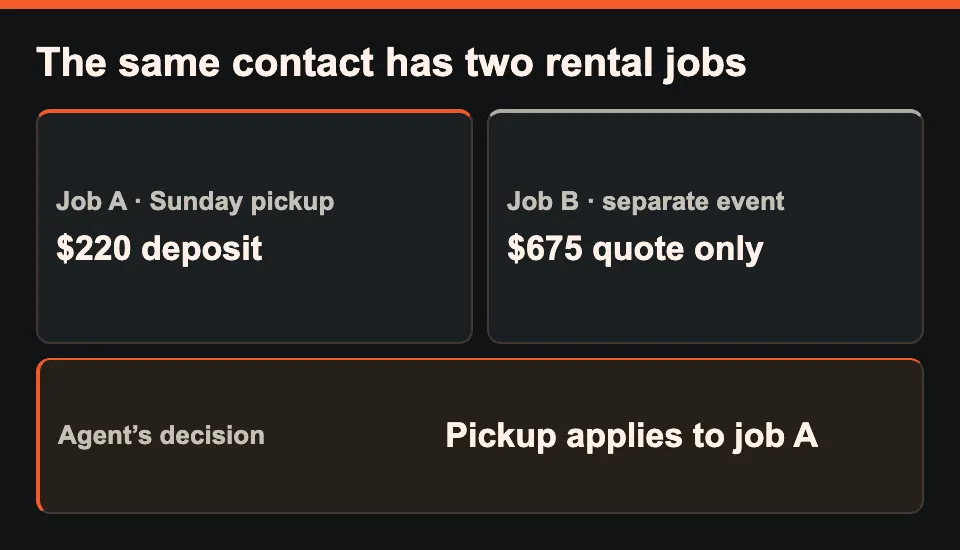
In a worked example, job A has a $220 deposit for a Sunday pickup. Job B has only a $675 quote.
A model that stores status at the contact level can show both as paid after the first deposit.
An opportunity or order record lets the CRM show the one customer and two different commitments.
The driver should see the pickup commitment on job A and an unsigned quote on job B.
Try updating the deposit status from two different places.
The second event should identify the same order and preserve any more recent decision.
Ask whether the connection can keep an event identifier and avoid applying duplicates.
Check what a sales rep sees when payment was acknowledged in chat but verified by another team.
An accepted quote and a cleared deposit can mean very different things to the installation schedule.
Check what gets carried into the weekly meeting
Choose an order matched to a campaign and another with no reliable source.
In the weekly report, make sure the unmatched one remains visible as unknown so the campaign is not credited with all sales.
Ask how source and customer records are connected and who can correct an error.
A change in assignment should affect who follows up while keeping the earliest trustworthy acquisition evidence.
Compare two completed jobs before and after the integration.
Look at the number of times the buyer was asked for a promised delivery date and whether next steps survived the handoff.
Check the same data from the view used by the person doing the work.
A report can look consistent while the frontline screen still omits the field that helps someone respond.
Keep the first integration tied to a real decision and test expansion once that decision is easier.
Sources · 2026-11-28 · Meta WhatsApp Business Platform · Meta webhooks
Related guides
FAQ
Is a CRM necessary when we already share an inbox?
A shared inbox may be enough for a small team. A CRM helps when you need durable records, separate opportunities, handover or reporting across more than one channel.
What makes an inquiry duplicate?
Use evidence from your processes. The same verified phone can identify one contact, but a return and a new quote normally remain separate requests.
Can we join product and payment details?
Start with relevant approved fields. Confirm source, freshness and access rules. Staff should be able to identify who can verify anything still uncertain.
What should we measure after first integration?
Count repeated questions, ownerless inquiries and how long it takes the next employee to act. Compare the same shift with your previous process.
How do we start with ClassMaster?
Send an anonymized handover and list what the next employee should be able to do. We can map that to the few fields needed first.